
Importing and exporting data
Diagram illustrates the various ways you can interact with Dotdigital to import and export data. Use the controls to zoom and pan, and click on features to learn more.
Dotdigital data import and export features and APIs
We provide many APIs and features for importing and exporting data to make integrating with Dotdigital as simple as possible for your tech stack. This article aims to help guide you to identify what features and APIs will best suit your integration needs.
The first consideration is how you want to pass data to or from Dotdigital:
- Using APIs - Our APIs allow you to create powerful integrations to Dotdigital and offer the most flexibility.
- Using a cloud storage and platforms - Use our integrated features to push and pull data using cloud storage like Amazon S3 or data platforms like Tableau or PowerBI.
- Using CSV files - Use CSV files with either FTP or manual processes to perform data exchange; usually best for one off processes.
- Using a pre-built integration
- Using agentic AI
API-based
To access the most functionality, flexibility, and features, Dotdigital's family of APIs is the best solution. REST-based for maximum compatibility, our APIs are simple to call and utilise.
We have a great range of APIs, all of which are covered in detail in the reference section, but here are our picks for common integration scenarios.
Best solution for syncing from Dotdigital
The Events API is the recommended way to establish a high throughput, low latency data synchronisation from Dotdigital to your platforms and systems.
The Events API removes the need to integrate to a multitude of APIs to sync any data changes you're interested in. Instead, just subscribe to the events you're interested in, and sync as often as you need.
Events cover a vast array of activity within Dotdigital, including:
- Changes to contacts
- Additions, deletions, or updates
- List membership updated
- Segment membership updated
- Changes to preferences
- Changes to marketing consent
- Messaging activity across all our supported channels:
- Message sent
- Message received
- Message status updates
- Interactions
- Link clicks
- Push messages tapped
- Social shares of your content
- Unsubscribes - attribute unsubscribes back to the campaign that triggered it
- Insight data changes
- Additions, deletions, and updates
- Collection changes
The full list of events supported can be found here.
Best solution for back-filling data from Dotdigital
Contact data back filling
The Contacts API provides bulk methods to pull contact information into your systems efficiently. The Get contacts based on your criteria call allows you to filter and tune what is returned for a contact, including their core data, preferences, list and segment membership, consent and more, all in one call.
Orders data, product catalogs and other data
The Insight data API controls access to both account and contact-level Insight data which includes orders, product catalogs, browsing behavior, and more.
The API provides methods to retrieve Insight data in bulk using pagination with optional modified date filtering. There's an API call, Retrieve records for contact-scoped Insight data collection, for retrieving contact-scoped data such as orders. Account-scoped data such as product catalogs can be retrieved using Retrieve records for a contact from Insight data collection.
Email campaign activity
For receiving ongoing campaign activity we recommend using the Events API, as it consolidates all activity into a single call.
For backfilling previous activity the following pattern can be utilised:
- Call Get campaigns with activity since date with the date you require to sync activity data from; this identifies any campaigns that have had any trackable activity such as opens, clicks, and shares since the date passed.
- Make a call for each campaign identified in step 1 as having activity. You have a choice of:
- Campaign summary statistics - If you only require statistics about the campaign and the activity associated with it then use Get campaign summary.
- Detailed interaction data for each contact - If you require detailed information on which contacts interacted with your campaign then use Get campaign activity since date, passing the same date as step 1.
- Detailed ROI data to contact level - If you require detailed ROI information, such as purchases and engagement, use Get campaign ROI activity since date, passing the same date as step 1.
- Campaign revenue statistics - If you need revenue and order statistics associated with the campaign then use Get campaign revenue since date, passing the same date as step 1.
Pages and forms submissions
For receiving pages and forms submissions:
- Call Get forms with activity since date with the date your require to sync form activity from; this identifies all forms that have had submissions from the date passed.
- For each identified form, call Get form responses with activity since date, passing the same date as used in step 1. This fetches all form submissions since the date.
Best solution for importing into Dotdigital
Contact data
The Contacts API provides a bulk method to import contact information into your systems efficiently. The Import contact collection call allows you to create or update contacts, including their core data, marketing channel statuses, preferences, list membership, consent and more, all in one call.
A maximum of 50MB of request data can be included per call, and the import is processed asynchronously. We recommend performing no more than 5 concurrent imports simultaneously. Any more than this causes longer import times and lower throughput.
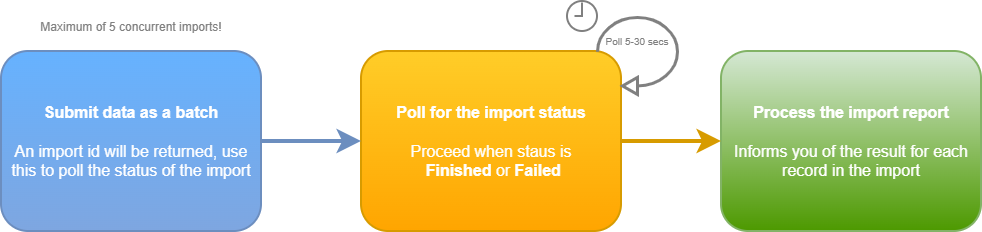
The method for polling for import job status is Retrieve the status of a contacts import request and once complete also returns the import report showing what contacts were created, updated or failed; this is also when you can capture the contactId for each contact sent to Dotdigital.
Orders data, product catalogs and other data
The Insight data API controls access to both account and contact-level Insight data which includes orders, product catalogs, consent insight, and more.
The Bulk import Insight data call allows you to create or update records in an Insight data collection.
A maximum of 50MB of request data can be included per call, and the import is processed asynchronously. We recommend performing no more than 5 concurrent imports simultaneously. Any more than this causes longer import times and lower throughput.
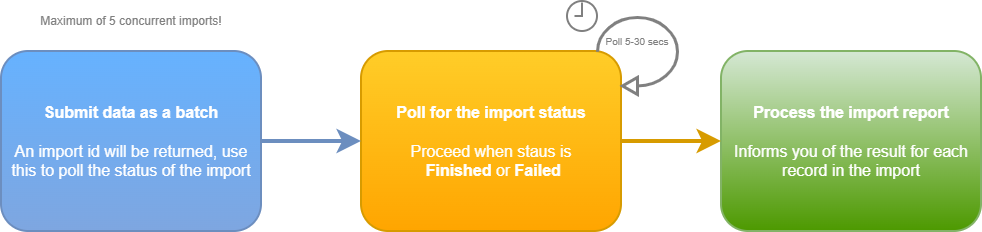
The method for polling for import job status is Retrieve the status of a Insight data import request and once complete also returns the import report showing the statistics for the report and any import failures for records.
API guide
The following table highlights some of our key APIs for importing and exporting data from Dotdigital:
| Feature/API | Description | Data import | Data export | Usage | Data types | Restrictions | Further info |
|---|---|---|---|---|---|---|---|
| Events API | Import batches of events against contacts (powers Single Customer View and segmentation) and export events for the whole account using subscriptions; large objects (LOB) supported for big payloads. | ✓ | ✓ | API | Custom events (JSON) keyed by contact identifier | CXDP only. | Events overview |
| Contacts API | End-to-end contact management — single contact create/update/get, bulk import (file or JSON) with merge options, import to specific lists, get contacts (all, created-since, modified-since, suppressed-since, unsubscribed-since), bulk delete, bulk suppress, plus contact data field configuration. | ✓ | ✓ | API | Contacts, contact data fields, consent, marketing preferences, suppression and unsubscribe records | Standard rate limit on standard plans; enhanced rate limit on CXDP. | Contacts |
| Insight Data API | Full lifecycle for Insight data collections at account or contact scope — create / list / delete collections, get JSON schema, upsert single records, bulk import records, retrieve, empty, poll import & async status. Supersedes the legacy Transactional Data endpoints. | ✓ | ✓ | API | Insight data (JSON records — orders, products, catalogues, custom objects, etc.) | Some Insight-data-powered features (Single Customer View, RFM, retail dashboard) require CXDP or an ecommerce-enabled plan. | Insight data |
| Webhooks API (CPaaS) | Real-time push of engagement events to a customer HTTPS endpoint, with template-driven event selection, optional filters and batching. | ✗ | ✓ | API | Engagement events (JSON over HTTPS POST) — email/SMS sends, opens, clicks, bounces, contact and Insight data events | Endpoint must accept HTTPS and return 2xx. | Webhooks |
| Campaign Reporting API | Retrieve campaign engagement data — sends, opens, clicks (with or without link groups), page views, ROI, daily metrics — full snapshot or "since date" change feeds. | ✗ | ✓ | API | Campaign engagement metrics, link clicks, opens, ROI | None. | Get campaign activity |
| Form Responses API | Retrieve all responses for a form, or only those changed since a given date. | ✗ | ✓ | API | Form / survey response records | None. | Get form responses |
| Bulk Phone Number Validation API | Queue a bulk validation job by uploading a CSV of numbers, poll for status, then download the results CSV. | ✓ | ✓ | API (CSV) | Phone numbers + validation results | Per-validation cost (consumes validation credits). | Bulk validate numbers |
| Documents & Images API | Upload PDFs, other documents and images into Dotdigital folders for use in campaigns. | ✓ | ✗ | API | Document and image binary files | Per-account storage limits. | Upload document / Upload image |
Cloud-based
If you need to import data into other third party cloud-based platforms and systems then the options listed in the table below should be considered.
Of particular note is the Data Firehose feature that can export a vast array of events as tabular data into cloud-based storage. This enables easy ingestion into other platforms that support data feeds from the same cloud storage platforms. For example, see our guide Export Dotdigital events to Snowflake using data firehose.
| Feature/API | Description | Data import | Data export | Usage | Data types | Restrictions | Further info |
|---|---|---|---|---|---|---|---|
| Data Firehose | Stream raw engagement, contact and Insight data events out of Dotdigital on a 15-min / hourly / daily cadence to Amazon S3, Azure Blob Storage, Google Cloud Storage or SFTP/FTPS. Configurable in the UI or programmatically via the Data Firehose API; documented Snowflake landing pattern available. | ✗ | ✓ | UI + API | Engagement events (CSV / JSON) — email, SMS, contact and Insight data events | CXDP only. | Data Firehose (developer) / Set up a data firehose |
| Program webhooks | Fire a webhook step inside an automation program to push contact and program context to an external system mid-journey. | ✗ | ✓ | UI | Contact + program context (JSON) | Requires Automation. | Enable a program webhook |
| Google Sheets connector | Push Dotdigital data (Campaigns, Contacts/lists, Forms) directly into a Google Sheet on a recurring update / append schedule. | ✗ | ✓ | UI | Campaign reports, list/segment counts, form responses | Requires a connected Google account; Google Sheets row limits apply. | Google Sheets: Campaigns |
| BI tool integrations (Looker Studio / Power BI / Tableau) | Visualise Dotdigital data in Looker Studio, Power BI Desktop and Tableau by sourcing it through the Google Sheets connector. | ✗ | ✓ | UI | Whatever is in the linked Google Sheet | Requires the Google Sheets connector first. Power BI integration is Power BI Desktop only. | Looker Studio / Power BI / Tableau |
| Microsoft Power Platform connector | Power Automate / Power Apps / Logic Apps connector that calls Dotdigital APIs as low-code actions. | ✓ | ✓ | UI (low-code) | Contacts, transactional email, programs, campaigns | Requires Microsoft Power Platform licensing. | Connect Dotdigital to the Microsoft Power Platform |
File based
If you need to do one off imports or exports of data then the following features should be considered as they offer simple setup via the UI and support for importing and exporting tabular data usually is CSV format:
| Feature/API | Description | Data import | Data export | Usage | Data types | Restrictions | Further info |
|---|---|---|---|---|---|---|---|
| Audience UI manual import/export | One-off file-driven contact management from Audience > Contacts — import contacts (with field mapping, suppression handling and report), export all contacts / a list / a segment / an automation program audience / an individual contact to CSV. | ✓ | ✓ | UI (file upload / CSV download) | Contacts and contact data fields in .csv, .xlsx, .txt or .zip | 50 MB upload limit. Exports retained in Exports area for 7 days. | Upload multiple contacts / Export contacts |
| Scheduled Data Importer (SFTP) | Hosted SFTP server with hourly / daily / weekly scheduled imports of contact files or Insight data files (v2 JSON schema). | ✓ | ✗ | UI (SFTP) | Contact files (CSV/XLSX) and Insight data (JSON, v2 schema) | 1 GB file size limit. Requires SFTP user setup. | Use the scheduled contact importer / Import Insight data |
| Suppression UI import/export | Bulk-suppress email or SMS contacts by uploading a file (mapped to email / mobilenumberid); export account- or list-level suppressed contacts to CSV. | ✓ | ✓ | UI (file upload / CSV download) | Suppression records (CSV / TXT / XLSX / ZIP in; CSV out) | None. | Add and remove suppressions / Export your suppressed contacts |
| Marketing preferences import/export | Import preference statuses alongside contacts and export preferences per contact via the Audience UI. | ✓ | ✓ | UI (file upload / CSV download) | Preference and consent flags | Requires preferences to be configured for the account. | Edit, import and export marketing preferences |
| Campaign report export (UI) | Export filtered email/SMS/MMS campaign report data as CSV from Analytics > Reports or from any individual campaign report. | ✗ | ✓ | UI (CSV download) | Campaign metrics (CSV) | None. | Export and filter data for email campaign reports |