
Imports a batch of Insight data records into a collection and upserts them.
This call either creates new records or updates already existing records. This is an asynchronous operation and you need to check when it is complete by calling Retrieve the status of an asynchronous request
If the Insight data collection does not exist it is created.
If targeting a contact-scoped Insight collection, then you must provide a contactIdentity for each record.
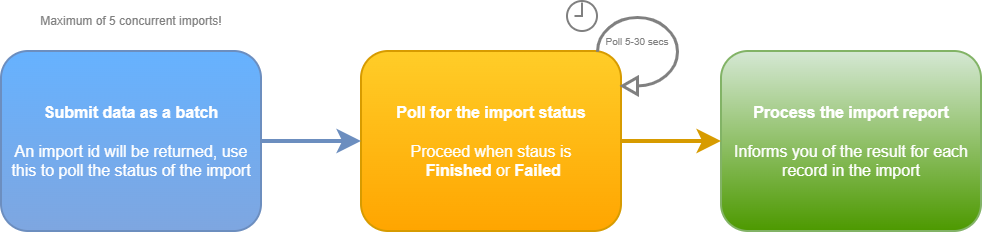
The most efficient pattern is to pass your data to us in the fewest calls. To achieve this, it's important to batch your data within your system and then send it to us. You can send a request up to 50MB, so many records can be sent in a single call.
You can run a maximum of five concurrent Insight data bulk imports per account. You should then poll periodically (recommend every 5-30 seconds) to check on the status of your bulk import using the retrieve Insight data import status call, passing the import ID the bulk import Insight data returned. When imports complete you can then continue to add more data.
Ensure contacts already exist to successfully bulk add transactional data to themYou need to ensure that the contacts you're bulk adding transactional data to already exist in the account. Contacts aren't created in this operation.
You can import a max of 50MB of data per call and a max of 5 concurrent importsYour JSON request body can be a maximum size of 50MB, therefore allowing a large number of records to be imported in a single call. You can run up to 5 concurrent bulk imports.
Unauthorized