
This method allows you submit data in bulk and an asynchronous calling pattern:
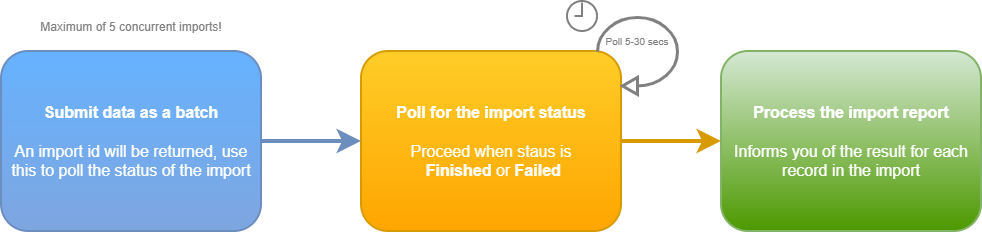
The method for polling for import job status is Get import status and once complete also returns the import report showing what contacts were created, updated or failed; this is also when you can capture the contactId for each contact sent to Dotdigital.
Phone numbersPhone numbers must be in international format (E.164); Google have a good library for reformatting phone number called libphonenumber which has been ported to most languages.
Import limitsYour JSON request body can be a maximum size of 50MB, therefore allowing a large number of contacts to be imported in a single call.
Active contact imports are limited to 25. If you exceed this limit, you get the
Too many active importserror.
Specifyingnullfor a data fields value clears the fieldYou must ensure that you only pass the fields you require to be updated for a contact.
We interpret a field passed with a
nullvalue as an instruction to clear the value for that field.Note: This only works with data fields in this call,not identifiers.
Unauthorized